Explore Over 100 Pathways to Your Future

Majors, Degrees & Programs

Accepted Students – Next Steps

Congratulations on being accepted to Grace College!

We are so excited to celebrate this milestone with you! Choosing a college is a major step and getting admitted is an even bigger thing to celebrate!

As an accepted Lancer student, you can see all of your personalized next steps on your Status Page.  Login with your personal email address and password to follow your checklist in the enrollment process.

Student Next Steps:

  • Schedule your campus visit and explore our beautiful campus!
  • File the FAFSA
  • Explore Community Scholarship options near you
  • Join our ZeeMee Community
  • Deposit

Parent Next Steps:

We know of the important role that you have along the college journey. Here are some helpful next steps for you as you walk alongside your student.


After You Deposit

Be on the lookout for an email from our Office of Information Technology with a link to create your Grace username and password. Instructions can be found on your status page. It may be in your spam or junk folder.

*Must be logged into your Status page using your personal email address and password.

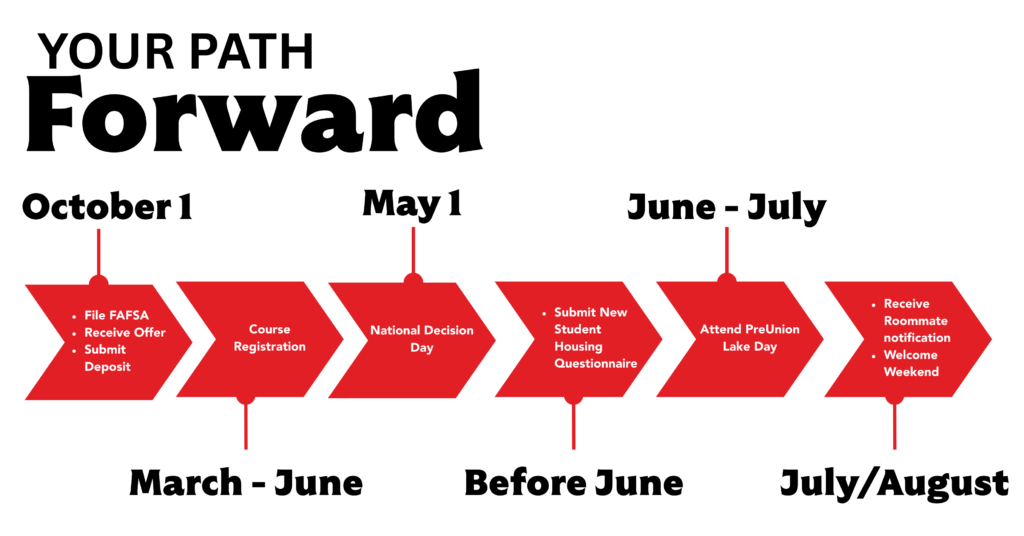
November-February
Register for housing! It’s quick and easy. Just follow the Submit New Student Housing Questionnaire form on your Status page. You’ll be redirected to our housing platform and you’ll want to make sure to login with your Grace username and password.

March-May
Begin class registration. This is where you’ll officially declare your major, submit transcripts and test scores (if applicable).

June
Attend one of our amazing PreUnion Lake Day events! We cannot wait to connect you with your classmates and future friends.

July
Receive housing information and make sure your Fall bill is paid! Don’t forget to register your car and upload your Student ID picture so you are ready for the great semester ahead of you.

August
Finalize your packing list and load up the cars! We cannot wait to see you for Welcome Weekend in August! *Make sure you register for a check-in time on your status page!

Connect with your Admissions Counselor or email us at admissionscounselor@grace.edu with your questions. We’re happy and ready to help!


Frequently Asked Questions

When is my Decision Due?

May 1 is National Decision Day! You’ll want to make sure your deposit is submitted before then as our housing selection is based on deposit date. The sooner you deposit, the higher you’ll be on the dorm selection process. You can submit your deposit anytime at www.grace.edu/deposit.

What is the Status Page?

This is an up-to-date checklist of items specific to you throughout the enrollment process. You’ll find digital copies of your acceptance letter, Student ID number, Financial Aid offers, housing forms, class registration forms and so much more. You can access it anytime at www.grace.edu/status.

When Can I Visit?

You are welcome to campus anytime! Great times to experience campus is through one of our upcoming Lancer Days or through a personalized campus tour! Visit www.grace.edu/visit to schedule your day!

How do I file the FAFSA?

Visit www.studentaid.gov to get started!

How Do I Register for Classes?

When the time comes to register, we’ll be in touch to help you get started for your first semester. Future updates will be sent to your Grace email.

What To Bring To College

Coming to college for the first time is a big transition. Living in a dorm room without anything or anyone familiar to you can be intimidating. We’ve compiled a list with helpful hints on what to bring to college.

Computer Recommendations
Bringing your own computer is key to your success as a student. The core technical resources all students will use (G Suite for Education, the Grace Portal, and the Grace Canvas) are web-based, so most functioning computers with a current operating system, web browser, and software will work.  However, Chromebooks and tablets are not recommended for all students as many majors require using the Microsoft Office suite.  Both the suite of Google apps and Microsoft Office are offered free of charge to active Grace students.

Grace also provides public printers in all freshman dorms and most upper-classman dorms.  Also provided is the equivalent of 200 free pages of black-and-white printing per semester to any lab or dorm printer on campus. The Office of Information Technology will support students in connecting personal devices to the wired and/or wireless network, in addition to providing basic diagnostic and repair services at no cost.

Where can my parents stay during welcome weekend?

There are many places in the Winona Lake area for your parents to stay while visiting for Welcome Weekend. Take a look at some of your hotel options.

View Welcome Weekend Information

Learn more about Welcome Weekend